A stylish home office design means little if it doesn’t support how you actually work. I redesigned my own setup three times before landing on something that balanced looking decent on video calls with genuinely helping me focus during long work sessions.
Choosing the Right Location Within Your Home
Quick answer: The best home office design starts with location — choose a spot away from high-traffic household areas, ideally near natural light, since poor placement undermines even well-furnished office setups through constant interruptions and eye strain.
If a dedicated room isn’t available, a quiet corner with a visual boundary (a bookshelf, a curtain) still works reasonably well.
What’s Actually Changing in Home Design This Year
Prioritizing Ergonomic Furniture
- An adjustable chair with proper lumbar support prevents long-term back issues
- Desk height should allow elbows to rest at roughly 90 degrees while typing
- Monitor placement at eye level reduces neck strain during long work hours
Lighting Considerations for Productivity and Video Calls
Natural light near the desk, supplemented with a warm desk lamp for evening hours, supports both focus and better video call appearance. Avoid harsh overhead lighting alone, which tends to create unflattering shadows and eye strain over long periods.
Managing Cable Clutter and Tech Setup
- Use cable organizers or trays to keep wires out of sight and off the floor
- Position power strips within easy reach but hidden from direct view
- Consider wireless keyboard and mouse setups to reduce desk clutter
Storage Solutions for a Functional Home Office
A well-designed home office needs enough storage to keep the desk surface clear — filing cabinets, shelving, or simple drawer units all work depending on available space and how much physical paperwork your work actually involves.
Incorporating Personal Touches Without Overcrowding
A plant, a piece of art, a favorite mug on the desk — small personal touches make the space feel less sterile without cluttering the functional workspace itself. [link to related guide on small space decorating ideas here]
Soundproofing and Noise Management
If your home office shares walls with noisy areas, simple solutions like a rug, curtains, or a door draft stopper can meaningfully reduce sound bleed without a full soundproofing renovation.
Creating Boundaries Between Work and Home Life
A home office design works best when it has clear visual or physical boundaries — even a curtain or room divider helps signal “work mode” versus “home mode,” which matters more for mental separation than people initially expect.
FAQ
Q1: What’s the most important factor in home office design? Location and lighting matter most — a quiet, well-lit spot supports focus better than expensive furniture in a poor location.
Q2: Do I need a dedicated room for a functional home office? Not necessarily — a quiet corner with a visual boundary can work just as well as a separate room for most people.
Q3: How important is ergonomic furniture in home office design? Very important for long-term comfort and health, especially an adjustable chair and proper desk-monitor height alignment.
Q4: What lighting works best for home offices used for video calls? Natural light supplemented with a warm desk lamp generally works better than harsh overhead lighting alone.
Q5: How can I reduce noise in a home office without major renovation? Rugs, curtains, and door draft stoppers can meaningfully reduce sound without requiring full soundproofing work.
Conclusion
Good home office design balances how a space looks with how well it actually supports focused work — location, ergonomics, and lighting matter more than aesthetics alone. Start with the functional basics, then layer in personal touches once the workspace genuinely works for your daily routine.
Suggested Alt Text:
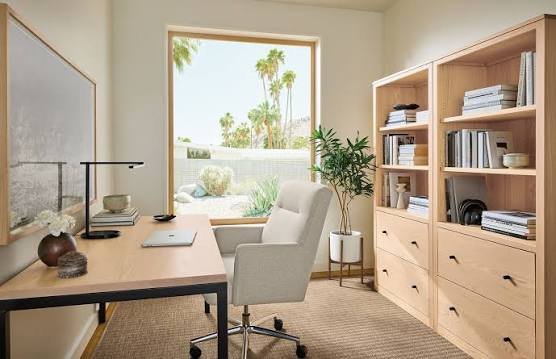
- “Ergonomic home office design with natural light and plants”
- “Organized home office desk with cable management setup”